
Import Table을 이용한 탐지
(악성코드 개발일지 11에서 이어짐...)
지난번에는 난독화(obfuscation)를 이용해 windows defender와 백신 개발일지 5에서 만든 백신을 우회하였다.
이번에는 이것 또한 잡을 수 있게 해봐야겠다...
악성코드 분석

어셈블리를 보면 쉘코드를 불러오는데 사용되는 주요 함수가 그대로 보인다
VirtualAlloc: 페이로드 저장용 공간 생성
VirtualProtect: 할당된 메모리를 excute 가능으로 바꾸기
CreateThread: 새 스레드 생성 및 페이로드 실행
이런 함수를 사용한다는 특징으로 잡아볼 수는 없을까?
Import Table
https://learn.microsoft.com/en-us/windows/win32/debug/pe-format#import-directory-table 참고
IDT (Import Directory Table)
어떤 dll을 쓰는지 기록된 최상위 배열
IMAGE_IMPORT_DESCRIPTOR의 배열
- IMAGE_IMPORT_DESCRIPTOR
Name: 이름 문자열이 저장된 주소
OriginalFirstThunk: ILT 시작 주소
FirstThunk: IAT 시작 주소
ILT (Import Lookup Table)
(import name table이라고 하기도 함)
가져올 함수의 원본 정보 저장
IAT (Image Address Table)
가져올 함수의 실제 주소를 저장
(처음에는 ILT = IAT였다가 실제 주소를 찾으면 IAT가 바뀜)
코드 구현
IAT를 찾기 위해선 Optional header에서 Import Table의 RVA를 찾아 따라가면 되지만, pefile 라이브러리를 이용하면 조금 더 쉽게 접근 가능하다!
import pefile

# 의심스러운 API 목록
suspicious_apis = [
    b"VirtualAlloc",
    b"VirtualProtect",
    b"CreateThread"
]

def analyze_iat(file_path):
    print(f"[*] Analyzing IAT of '{file_path}'... \n")

    # PE 파일 로드
    try:
        pe = pefile.PE(file_path)
    except Exception as e:
        print(f"file open error")
        return

    # IAT 정보가 있는지 확인
    if not hasattr(pe, 'DIRECTORY_ENTRY_IMPORT'):
        print("[-] no IAT error")
        return

    # 로드하는 DLL과 API 목록 순회
    for entry in pe.DIRECTORY_ENTRY_IMPORT:
        dll_name = entry.dll.decode('utf-8', errors='ignore')
        print(f"[DLL] {dll_name}")

        for imp in entry.imports:
            # API 이름이 존재하는 경우 (이름 대신 Ordinal 번호로 가져오는 경우도 있음)
            if imp.name:
                api_name = imp.name

                # 의심 API 목록에 있는지 확인
                if api_name in suspicious_apis:
                    print(f"  [WARNING] suspicious API: {api_name.decode('utf-8')}")
                else:
                    print(f"  ├─ {api_name.decode('utf-8')}")
            else:
                print(f"  ├─ (Ordinal: {imp.ordinal})")
        print("-" * 40)

def detect_iat(file_path):
    is_malicious = False
    # PE 파일 로드
    try:
        pe = pefile.PE(file_path)
    except Exception as e:
        print(f"file open error")
        return

    # IAT 정보가 있는지 확인
    if not hasattr(pe, 'DIRECTORY_ENTRY_IMPORT'):
        print("[-] no IAT error")
        return

    # 로드하는 DLL과 API 목록 순회
    for entry in pe.DIRECTORY_ENTRY_IMPORT:
        for imp in entry.imports:
            if imp.name:
                api_name = imp.name
                if api_name in suspicious_apis:
                    print(f"detected: {api_name.decode('utf-8')}")
                    is_malicious = True
            else:
                pass # ordinal 번호는 직접 테이블을 만들어 대조해야 함...
    if is_malicious == True:
        print("malicious!")
    else:
        print("benign!")


if __name__ == "__main__":
    target_exe = "./local_shellcode_injection(bypass).exe"
    #analyze_iat(target_exe)
    detect_iat(target_exe)
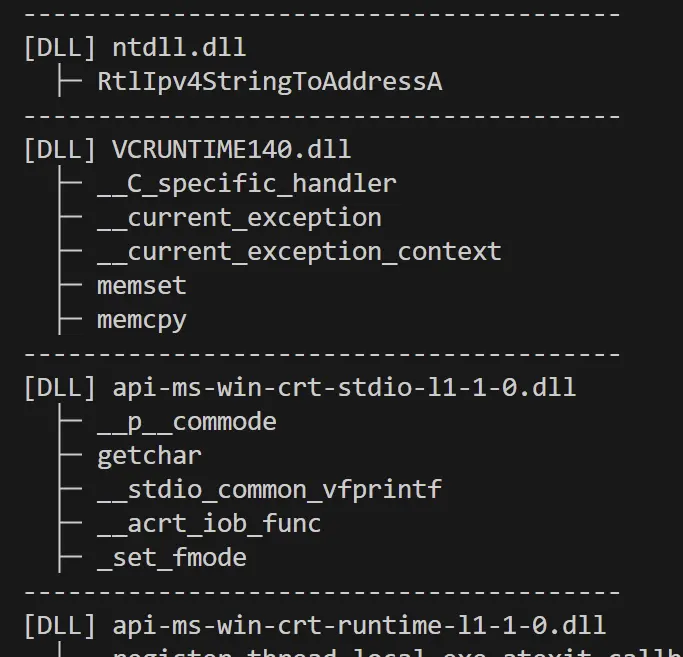
Analyze mode로 돌렸을 때는 DLL과 import한 함수 목록이 다 뜬다
Detect mode로 돌렸을 때는 suspicious_apis에 있는 함수가 import되었다면 그 목록을 출력하고 malicious라고 판정한다!
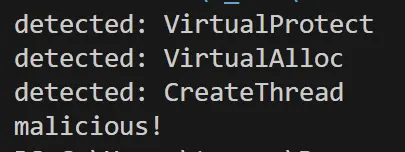
이렇게 local_shellcode_injection(bypass) 버전도 잡을 수 있었다
모든 자료는 여기에
https://github.com/VeryBigsilver/malware-vaccine/tree/main/5_Import_table
'악성코드와 백신 > 백신 개발일지' 카테고리의 다른 글
| [백신 개발](7)[레지스트리 키 치료] (0) | 2026.03.20 |
|---|---|
| [백신 개발](5)[시그니처 탐지] (0) | 2026.03.13 |
| [백신 개발](4)[바이러스 db] (0) | 2026.03.05 |
| [백신 개발](3)[EICAR 변종 탐지] (0) | 2026.03.04 |
| [백신 개발](2)[EICAR test file] (0) | 2026.03.03 |